Your Dating Profile Photo Is Doing More Work Than You Think
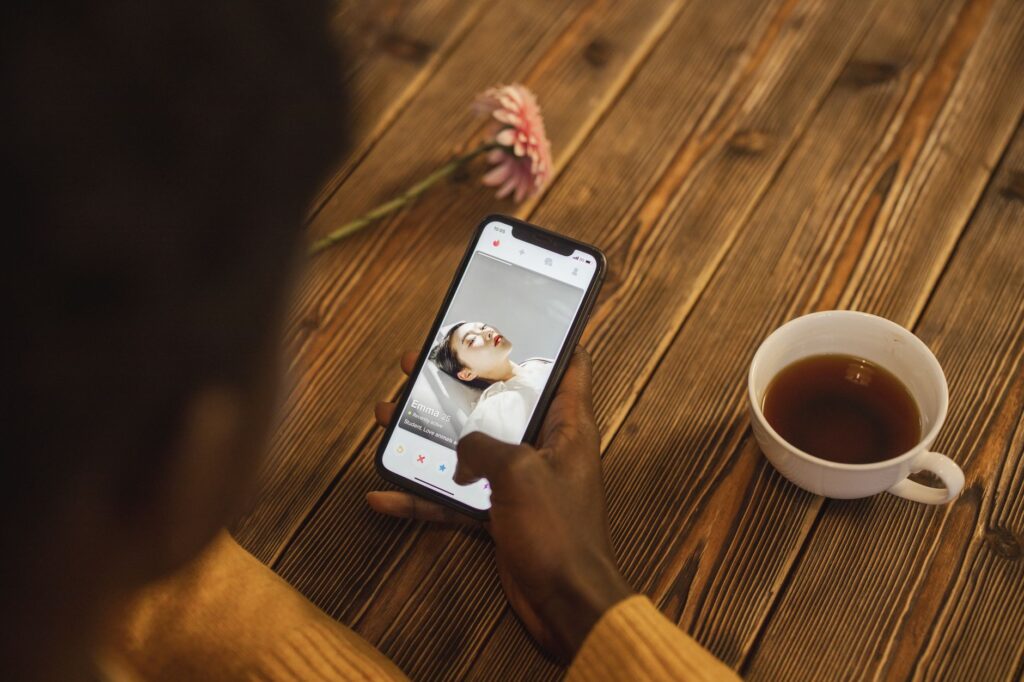
Roughly 80% of dating app users swipe based on photos before reading a single word of your bio. That one image you uploaded three years ago, slightly blurry, taken at your cousin’s wedding, is quietly killing your chances every single day.
AI image tools have changed what’s possible here. Whether you want to enhance what you already have, generate entirely new profile photos, or finally look like the version of yourself you feel like on your best day, the technology is genuinely good enough to use now. This isn’t about catfishing anyone. It’s about presenting yourself with the same intention a professional photographer would bring, without paying $400 for a shoot.
Here’s exactly how to use AI dating profile images to your advantage, what tools actually work, and where the limits are.
Understanding What AI Can (and Can’t) Do for Your Photos
Before you dive into any tool, get clear on what you’re working with. AI image generation and enhancement fall into two distinct categories, and confusing them leads to disappointment.
The first category is AI photo enhancement. These tools take an existing photo of you and improve it: better lighting, sharper focus, cleaner backgrounds, improved color grading. Tools like Remini, Facetune, and Adobe Lightroom’s AI features all fall here. If you’ve got decent raw photos but they look flat or slightly off, this is your fastest path to better results.
The second category is AI portrait generation. These tools use multiple photos of you as training data to generate entirely new images in different settings, outfits, and lighting conditions. Platforms like Aragon AI, Portrait AI, Try It On AI, and the now-famous Lensa app work this way. You upload 10 to 20 photos of yourself, the model trains on your face, and then it produces dozens of polished portraits you’d never be able to capture with your phone.
Dating photo AI sits at the intersection of both. The best results usually come from combining them: generate strong base images, then run them through an enhancement layer to tighten up skin texture, color, and light consistency.
Choosing the Right Tool for Your Situation
Not every platform delivers the same results, and the differences matter when you’re putting these photos in front of real people making fast judgments.
For AI Portrait Generation
Aragon AI is consistently one of the better options for realistic, professional-looking portraits. You upload your photos, select styles (think: outdoor lifestyle, business casual, golden hour), and get back images that look like they came from an actual photoshoot. The faces hold up well to scrutiny, which is the main failure point for most AI portrait tools. Expect to pay around $29 to $49 for a full package.
Lensa AI’s “Magic Avatars” feature is more artistic and stylized. Great for creative personality, less great if you want something that could pass for a candid photo someone took of you at a park. Know your audience on the apps you’re using before going this route.
Profile Image AI tools like PhotoAI and HeadshotPro are also worth mentioning. They’re primarily designed for professional headshots, but the same clean, well-lit, natural-looking outputs translate directly to dating profiles. A genuinely good headshot outperforms a mediocre lifestyle photo almost every time.
For Enhancement and Editing
If you already have photos where the composition and expression are right but the technical quality is letting them down, Remini is worth $10 a month. It sharpens faces and recovers detail from lower-resolution images without making you look plastic. Adobe Firefly’s generative fill can also swap out distracting backgrounds, which is underrated for dating photos. That busy kitchen background becomes a clean neutral wall in about 30 seconds.
Enhance photo AI dating tools specifically tuned for portraits also include PortraitAI and Picso. Both run quick enhancement passes that improve skin tone, lighting balance, and sharpness without the uncanny valley effect you get from overdone retouching apps.
How to Get the Best Results from AI Portrait Tools
The quality of what you get out depends heavily on what you put in. Most people upload garbage source photos and then wonder why the outputs look weird. Here’s how to stack the deck in your favor.
Upload variety, not volume. If you’re uploading 15 photos and 12 of them are selfies from the same angle in the same room, the AI trains on a narrow version of your face. Include front-facing shots, three-quarter profiles, photos with different lighting (natural daylight, indoor, outdoor), and varying expressions. Smile, look neutral, look slightly away from camera. Give the model range to work with.
Avoid glasses, hats, and heavy filters in your source photos. These confuse the model’s understanding of your actual features. The AI might generate you with glasses in every single output, or worse, produce weird artifacts where accessories used to be.
Use high-resolution originals. This isn’t the place for compressed screenshots or photos you downloaded from Facebook. Export directly from your phone’s camera roll. The higher the resolution, the more detail the model preserves in outputs.
Request realistic styles, not fantasy ones. When a platform asks you to choose aesthetic styles for your outputs, lean toward lifestyle, outdoor, urban, and professional. Avoid cinematic, fantasy, or artistic unless you’re on an app where that kind of personality signals something positive. On Hinge or Bumble, you want photos that look like they could plausibly have been taken by a friend. On something like Feeld or Raya, more distinctive visuals might actually help you stand out.
The Authenticity Question You Can’t Ignore
Here’s the honest tension in all of this. Dating ai images can make you look significantly better than your average phone photo. They can capture the version of you that exists on your best days. But they can also set an expectation you won’t meet in person, and that’s where using these tools gets complicated.
The goal isn’t deception. It’s accurate representation at your best. Think of it the way you’d think about wearing a good outfit to a first date instead of showing up in sweatpants. You’re not lying about what you look like. You’re simply presenting yourself intentionally.
That said, there are real limits to stay inside. Don’t use AI to change your face structure, body type, or apparent age significantly. Don’t use outputs that look nothing like how you actually show up. The first impression you create with a photo needs to survive a face-to-face meeting, or you’ve just engineered a bad date for both people.
A reasonable test: show the AI-generated photo to a friend who knows you well and ask if it looks like you on a good day. If they say yes, you’re in the clear. If they say “wow, you look completely different,” dial it back.
Which Photos to Use and How to Arrange Them
Generating great images is only half the work. Most dating apps let you upload six to nine photos, and that sequence tells a story. Here’s how to structure it when you’re working with AI-generated and enhanced content.
- Lead with your clearest face photo. The AI portrait or enhanced headshot goes first. This is your main swipe image and it needs to immediately establish what you look like. Sharp, well-lit, genuine expression.
- Follow with something contextual. A photo that suggests personality or lifestyle. If your AI portrait tool generated a good outdoor or activity-based image, this is where it goes.
- Include at least one or two genuine unedited photos. Actual candid shots, even if they’re slightly less polished than your AI images, add credibility. A mix of AI-enhanced and real photos reads more authentic than a gallery of suspiciously perfect portraits.
- Avoid photos where you look like a different person. Three photos that look nothing alike confuse the viewer and raise suspicion. Consistency matters more than variety in how you physically appear.
Apps like Tinder and Hinge also now use algorithms that reward engagement, not just initial swipes. If people swipe right but don’t message, or message and then ghost after seeing more photos, your overall visibility drops. Authentic consistency across your photo set protects against that.
The Technical Workflow That Actually Works
If you want to pull this together practically, here’s the workflow that consistently produces usable results without spending a week on it.
Start by pulling your 15 best photos from your camera roll. Prioritize variety in angle, lighting, and setting as described above. Run them through Remini first if any are lower quality. Upload the best 10 to 15 to Aragon AI or PhotoAI, select two or three realistic style categories, and generate your package. From the outputs, pick the five to eight that look most like you and feel most natural. Run those through a final enhancement pass if needed, fix any distracting backgrounds with Adobe Firefly or Remove.bg, and you’ve got a complete set ready to upload.
Total time investment is roughly two to three hours. Total cost is somewhere between $30 and $60 depending on which tools you use. Compare that to a professional photography session, which typically runs $200 to $500 and takes half a day.
Stop Letting a Bad Phone Photo Make Decisions for You
Your dating profile photos are working around the clock, representing you to hundreds of potential matches who’ll never give you a second look if that first image doesn’t land. AI tools have made it genuinely practical to fix that without a huge investment of time or money. Use them deliberately, stay honest about who you actually are, and let the technology do what it’s built to do: help you show up looking like your best self. The conversation, the chemistry, the real connection? That part is still entirely on you.